
Printed
Printed lists the parts you 3D-print for this drone, such as the camera mount and the battery pad. You do not choose them from a catalog: Lothal generates each one from the parts it has to fit.
Where it is
Section titled “Where it is”Click Printed in the section row. The list has one row per part this drone needs printed. Change the parts on the drone and the list changes with them.
The parts
Section titled “The parts”Depending on what is fitted, the list can include:
| Part | What it is |
|---|---|
| Camera mount | TPU cheeks that hold the camera at its uptilt. |
| Antenna mount | A standoff clamp and tube for the video antenna. |
| GPS mast | A printed stalk that stands the GPS above the top plate. |
| Battery pad | A TPU grip pad under the pack. |
| Arm guards | TPU sleeves over the arm ends, to protect the carbon and the motor wires in a crash. |
| Prop guard | Listed only when a guard is fitted under Propulsion. It is chosen there, not here. One ring; print four. A guard the catalog lists as bought has nothing to print. |
| Frame | Listed only when the catalog says the fitted frame can be printed. |
Each row shows:
- Line 2: the material.
- Line 3: what one piece weighs, computed from its own exported shape, and how many to print. If the part was printed before and has changed since, the row shows that instead.
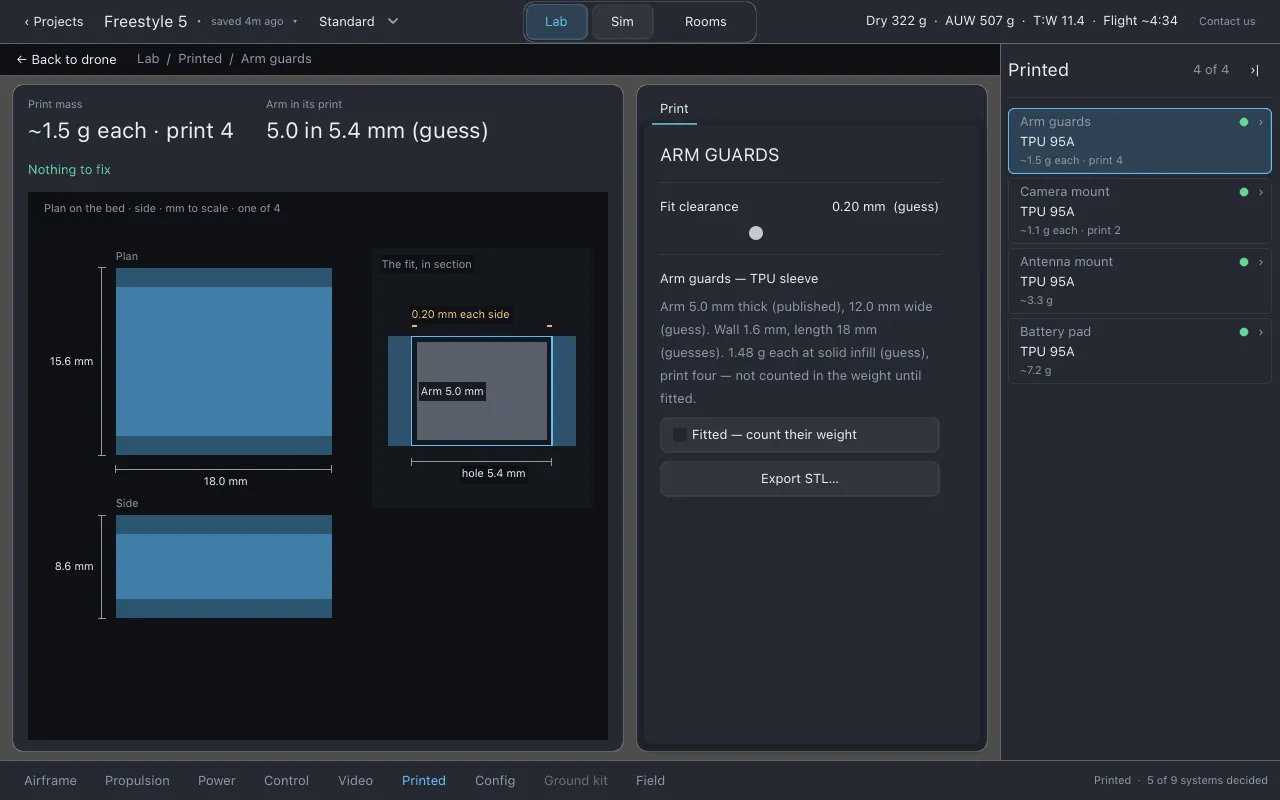
Click a row for its page: Print mass, and either how well the bought part sits in the print or the print’s size, beside a drawing of the part.
The Print sheet
Section titled “The Print sheet”- Fit clearance. The gap left on every side where a printed part meets a bought one. It starts at 0.20 mm, which is a guess: a well-tuned printer wants about 0.15 mm, a tired one 0.35 mm. Print one part and adjust. Nothing in Lothal can measure your printer. The clearance is saved with this drone, not across drones.
- Parts. For each part: a Fitted checkbox, which puts it on the drone (and, for the parts that weigh something, counts its weight), the part’s own size settings, and Export STL… for that part alone.
Every printed part’s mass assumes TPU 95A printed solid. A part printed with less infill is lighter than the row says.
Exporting
Section titled “Exporting”- Export STL… on the sheet writes one part.
- Export printed parts… in the project menu writes every
part this drone prints. Each is written to the
exportsfolder and into the drone’s own.lothalfile, with a record that it was printed. A part that cannot be generated is named and skipped; the rest are still written.
See Exports.
Printed before: Keep or Reprint
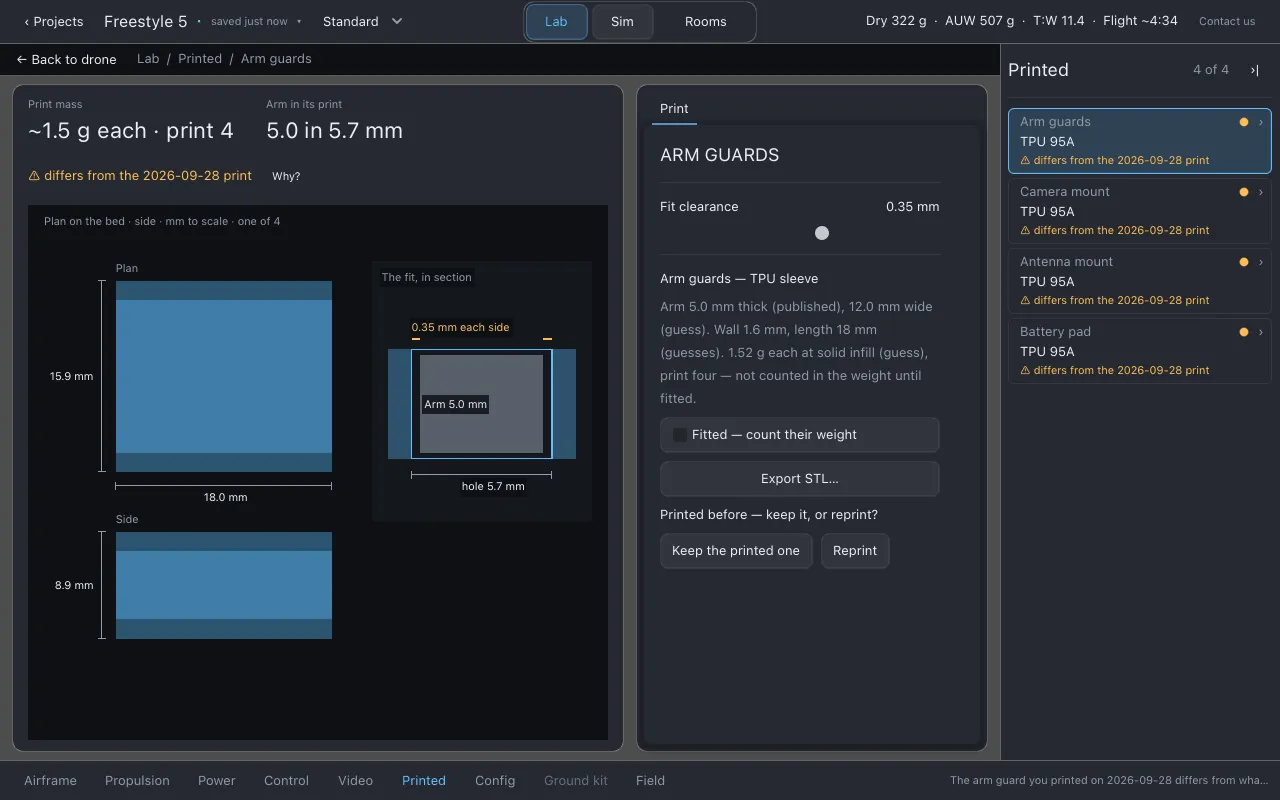
Section titled “Printed before: Keep or Reprint”A printed part is a physical object; it does not update when the drone changes. So when you open a drone, Lothal regenerates every part that has been printed and compares it with the most recent print.
- Matches: nothing is said.
- Differs: the part says Printed before — differs from today, with the date and the cause where the record can prove it (the camera uptilt, the fit clearance, or a newer version of the part’s generator). Choose Keep the printed one or Reprint.
- Gone: the drone no longer needs the part. This is reported and the record is kept.
- Missing file: the printed file is no longer inside the drone. This is reported.
Keep hides that one difference. A later, different change to the same part is reported again. Nothing is deleted.
The camera uptilt is shared by every drone, so moving it can make every drone’s camera mount differ from its print.
What to watch for
Section titled “What to watch for”cannot be generated: the part cannot be made for this build; the row says why.printed file missing from droneandprinted one no longer generated.
Honest limits
Section titled “Honest limits”- The fit clearance and the solid-infill mass are guesses and are labelled as guesses.
- Printed parts are simple generated shapes, not a general 3D modeller.
Related
Section titled “Related”- Video: the camera and antenna the mounts are made for
- Exports
- File formats: what is inside a
.lothalfile
Documentation licensed underCC BY 4.0. Lothal itself is GPL-3.0-or-later.Report a problem.Roadmap.